Each day is rated on session cover. Every doctor contributes one point per AM and one per PM, so a half-day locum correctly fills half a doctor's gap. Sessions spent in meetings, tutorials, admin or student lectures don't count, because patients can't be seen. Up to 3 sessions short stays green (managed on the day). A day turns amber at 4 sessions short, red at 5 or more, and always red if the rostered on-call doctor isn't actually in. Tap a day to open it on the rota.
Day-by-day view of cover. Tap a day to open its ledger, or its status to see the day in the leave calendar.
| Date | Weekday | Sessions covered | Status | Why | On-call AM / PM | Who is off | Locum cover |
|---|
Who is off, per doctor. Entries are added on the Admin tab. · Open Avensure absence calendar ↗
Check or request leave
Check shows the effect on the rota without changing anything. Request this leave checks it too, then prepares an email to the practice admin for approval. Nothing goes on the rota until the admin approves it.
A SystmOne-style view of one day, built from the roster, leave, on-call and teaching timetable. Shows what each session is being used for — clinical, on call, teaching, leave or a blocked commitment.
Cover options
Find who could fill a gap, then alert them. Rooster checks the rota and leave, so only people who are free are listed. The first to book gets the session and goes on the rota; if it was on-call, on-call moves to them too.
Leave requests
Everything waiting for a decision, from Rooster and from Avensure, checked against the rota, against leave already approved, and against each other. Approve marks it approved in Rooster; it then waits for Avensure, the master record, and the GP is emailed once Avensure approves it too (or you press Confirm without Avensure). Reject changes nothing and tells the GP. Only admins see this page.
Recent decisions
| Doctor | Dates | Type | Decision | Decided | Note |
|---|
Leave from Avensure
Rooster reads the Avensure absence calendar every morning at 6.10am. Use this if you need it sooner — after approving a batch of leave, for example.
Weekly update
Drop in this week's rota export from SystmOne (.csv or .xlsx). Rooster checks it against what it holds and shows exactly what would change before anything is applied; the last update can be undone. Leave comes in from Avensure automatically every morning — use Refresh now above if you need it sooner.
What the files need
Rota: one row per clinician per session with Date, Session (AM/PM) and Clinician, plus the Session name from SystmOne. “On Call” in the session name sets on-call; PCN, tutorial, admin, meeting and training sessions are treated as non-clinical. For each date in the file, the imported rota replaces the standard weekly pattern.
Leave: one row per absence with Clinician, Start date, End date, and ideally Session (Full day/AM/PM), Type and Status (Approved / Awaiting approval).
Column names are matched loosely (“Employee”, “Staff”, “From” and so on). If an export isn't recognised, paste its columns into the template.
Imported rota — make changes
The sessions imported for a week. Edit, add or remove sessions here for last-minute changes; leave, on-call swaps and one-off changes are made on their own tabs as usual.
| Date | Session | Clinician | Session name | Non-clinical | Actions |
|---|
Names in exports
How a name is written in SystmOne or Avensure, and who it is in Rooster. Filled in automatically when you choose during an import.
| As written in the export | Rooster name | Actions |
|---|
Recent updates
Ask a colleague to cover
Not in use yet. When the practice starts using swaps, this is where a request is made and answered.
Ask a colleague to cover or swap
For a session you're rostered for. Rooster shows who is free; ask one or several — the first to accept gets it, and the others are told it's covered. Cover is one-way; a two-way swap means you take one of their sessions back. One session per request.
Swap requests
Requests you've been sent, or sent yourself. Open a request email in Rooster by pasting it here; Show on calendar highlights the date above.
Swaps
When a colleague accepts a cover or swap, their email comes to you. Paste it here and press Apply swap — the first acceptance applied wins, the rota updates (on-call moves with the session), and Rooster prepares the confirmation and a “now covered” email for everyone else asked.
Standard operating procedure
Rooster — rota, on-call and absence · version 1.3 (draft for review) · 5 October 2026
| Title | Rooster — rota, on-call and absence: standard operating procedure |
|---|---|
| Version | 1.3 (draft for review) |
| Date | 5 October 2026 |
| Owner | Dr Ned Tapley, GP Partner, Digital Lead and Digital Clinical Safety Officer |
| Approved by | Partners’ meeting — date to be recorded |
| Next review | 5 April 2027, or sooner if Rooster or the practice's processes change |
| Applies to | All GPs, GP trainees and locums at Ealing Park Health Centre, and the staff who manage the rota |
1. Purpose
This procedure sets out how Ealing Park Health Centre uses Rooster to plan and check the clinical rota, on-call cover, leave and absence; how staff request leave and swap sessions; and how the practice fills gaps by offering sessions to colleagues. Its aim is that every working day has the clinical cover the practice expects, with on-call always staffed, and that changes are recorded consistently by everyone.
2. Scope
In scope: the GP rota and on-call cover; recording annual leave, study leave, meetings, unplanned absence and non-clinical sessions; the weekly check against SystmOne and the daily leave sync from Avensure; leave requests and decisions; swaps between colleagues; offering sessions to colleagues to fill gaps; student teaching; recurring commitments such as PCN meetings and tutorials; and the weekly on-call message.
Out of scope: reception and nursing rotas; appointment booking (which remains in SystmOne); locum booking through agencies; and leave entitlement, balances and HR absence records, which remain in Avensure until the practice formally decides otherwise (see section 9).
3. Roles and responsibilities
| Role | Responsibilities |
|---|---|
| Rota custodian (admin) | Runs the weekly SystmOne check; records absence; applies on-call changes and swaps; checks the Month view for amber and red days and resolves them, using cover alerts or locums; sends the weekly on-call message; invites new staff and removes leavers. Named in the practice's rota arrangements, with a named deputy (a second admin) for absence. |
| Approver (practice manager or delegated partner) | Decides leave requests using Rooster's cross-check against cover, approved leave and other requests. Requests made in Avensure are decided in Avensure. May be the same person as the custodian. |
| Clinicians (GPs, trainees, locums) | Check and request leave; arrange swaps for sessions they cannot work; respond promptly to swap requests and cover alerts; report absence to the custodian as early as possible. |
| Digital Clinical Safety Officer | Owns this SOP and the clinical safety assessment of Rooster; maintains the hazard log; reviews incidents involving rota or on-call gaps. |
| Tiers in Rooster | Admin — the custodian, approver and Digital Clinical Safety Officer: full access, including the Admin area. User — clinicians: view the rota, request their own leave, swap sessions, and book sessions offered to them. Accounts not linked to a doctor (for example reception) can view the rota only. |
| Partners | Approve this SOP; decide the expected cover for each weekday and the rates offered for extra sessions; decide on any move away from Avensure as the record of entitlement. |
4. Definitions
| Term | Meaning |
|---|---|
| Session | A morning (AM, 08:00–13:00) or afternoon (PM, 13:00–18:30) of clinical work. A full day is two sessions. |
| Expected cover | The number of sessions the practice expects covered on each weekday, set on Admin → Settings. Each day is judged against it. |
| On-call | The GP holding urgent and duty work for a session, rostered by weekday on Admin → On-call. |
| SystmOne check | The weekly comparison of the SystmOne rota export with Rooster. It proposes changes; nothing is changed until the custodian applies them. |
| Avensure sync | Rooster reads the Avensure absence calendar every morning at 06:10, including requests not yet decided. |
| Awaiting approval | Leave that has been requested but not decided. Shown striped; it does not reduce cover. Colleagues cannot see other people's waiting requests. |
| Swap / cover | A colleague takes another's session one way (cover), or each takes one of the other's (two-way swap). |
| Cover alert | An offer of an extra session, sent by an admin to colleagues who are free, with times and rate. The first to book gets it. |
5. Getting into Rooster
- Rooster is a website: roosterrota.co.uk. Its data is held in one database hosted in the United Kingdom, so everyone sees the same, up-to-date rota on any device.
- Staff join by invitation only. An admin sends the invite from Admin → Users; the link works once and lasts seven days. The person checks their details, agrees to the staff notice and chooses a password.
- Sign in with your NHS email and password. A forgotten password is reset with the link on the sign-in screen; a reset email is sent to the account's own address.
- On a phone, open the site in Safari or Chrome and choose Add to Home Screen; it then opens like an app. When a new version is released, a bar offers Reload.
- Tapping your initials (top right) opens Chats; profile & sign out is at the top of Chats. The bell turns red with a count when something needs your attention.
- Admins who are also on the rota choose Just me or Admin view. It is one account; the switch changes what is shown, not what the person may do.
- Most admin tasks are designed for a computer. Several Admin tabs are hidden on a phone.
6. Procedures
6.1 Weekly update (custodian, weekly)
- Leave arrives automatically. Avensure is read every morning at 06:10. To bring it in sooner (after approving a batch, for example) press Admin → Weekly update → Refresh now.
- Check the rota against SystmOne. Export the rota from SystmOne (the admin team builds it about two weeks ahead) and drop the file onto Admin → Weekly update.
- Rooster compares only the days SystmOne has built, ignores holding lines (ON CALL, Dr; LOCUM; NHS111) and non-GP staff, and under Review the changes SystmOne suggests shows:
- Working patterns that differ every week — a doctor's usual days differ from Rooster. Tick only if the change is permanent.
- On call in SystmOne — tick to update the weekly on-call pattern, or the individual dates where SystmOne differs.
- Locum cover — doctors in SystmOne who are not on Rooster's roster. Adding them counts those sessions towards cover.
- Sessions missing where Rooster expects a doctor and no leave is recorded — usually unbooked leave, a changed pattern, or a session not yet built. Check with the rota team.
- Nothing changes until you press Agree selected changes. Every action is listed under Recent updates.
6.2 Checking cover (custodian, weekly and after any change)
The Month view rates each working day, and the Day ledger shows the same colour at the top of each day:
| Rating | Meaning and action |
|---|---|
| OK (green) | All expected sessions covered and on-call staffed. No action. |
| Shortfall (amber) | 4 sessions short. Review; offer a session if needed (6.9). Up to 3 short is green: absorbed with extra on-the-day appointments and through the week. |
| Shortfall (red) | 5 or more sessions short, or on-call not covered. Must be resolved before the day. |
| Closed | Bank holiday or practice closure. |
On-call counts as uncovered if the rostered doctor is on leave, not working, teaching, in a non-clinical session, not yet in post, or if nobody is assigned — whatever the headcount. Each day states its reason. From the ledger, See cover options opens the people who could fill that day.
6.3 Recording absence (custodian)
- Planned leave normally arrives from Avensure (6.1). Record anything else on Admin → Leave entries: doctor, dates, session (full day, AM or PM) and type — Annual Leave, Study Leave, Meeting, Absent, Admin (non-clinical) or Other.
- Record unplanned absence as soon as it is reported; Rooster updates the Month view, the ledger and the on-call message immediately. Colleagues see “Absent”, never the reason.
- Check the Month view for any day that turns amber or red, and offer the session if needed (6.9).
- Once, after go-live: run Admin → Leave entries → Old Avensure copies. It removes duplicate rows left from the original file import, which otherwise hide declined requests and double-count leave. A backup downloads first.
6.4 Changing on-call (custodian)
- The standard on-call pattern by weekday is on Admin → On-call.
- For a single date, add a date override; the standard pattern is not affected.
- Never leave a session without an on-call doctor. Trainees are not rostered on call.
6.5 Recurring commitments and one-off changes (custodian)
- Standing commitments — PCN meetings, trainee portfolio review, ST1 tutorials — are set on Admin → Recurring by weekday and occurrence (first, second, third or last of the month, every week, every week except the first, or every other week from a chosen date). They remove clinical capacity for that session.
- To change one for a single date, add a one-off change: Skip or Reassign. A ⚠ means the block does not fall on the date chosen.
- Delete recurring rules when a commitment ends; they otherwise repeat indefinitely.
6.6 Student teaching (custodian, each term)
- Enter the teaching timetable on Admin → Teaching: date, AM clinic GP and PM lecture GP.
- A teaching clinic runs six 20-minute contacts with debriefs; a lecture has no patient contacts.
- The current timetable runs to 8 January 2027. Add the next term before then.
6.7 Requesting and deciding leave
Clinician:
- Leave tab → Check or request leave. Enter the dates, session and type, and press Check to see the effect on cover before asking.
- Request the leave through Rooster (Request this leave) or Avensure, in line with practice policy. Both appear on the admin's Leave requests page.
- If you are rostered in that period, arrange a swap (6.8) before or alongside the request.
Approver: the Leave requests tab lists everything waiting, in two sections:
- Requested in Rooster — decided here with Approve or Reject, with an optional note. Approving moves it to Waiting for Avensure: it still shows as awaiting approval and no email goes out. When the morning sync finds it approved in Avensure, Rooster confirms it and emails the requesting GP only. Confirm without Avensure is the manual override for leave agreed outside Avensure.
- Awaiting approval in Avensure — decided in Avensure (Decide in Avensure). Rooster picks up the decision at the next sync. A request Avensure sends in several periods is shown as one request.
- Each request carries a clash label and a cross-check grid: the requester, colleagues already off, and colleagues also waiting (striped), then cover now, if this one is approved, and if all overlapping requests are approved. Decide overlapping requests together, not one at a time; Rooster asks for confirmation before approving one that overlaps another.
- Record leave approved in Rooster in Avensure as well while Avensure remains the record of entitlement.
6.8 Swaps between colleagues
- Doctor: Leave tab → Ask a colleague to cover or swap. Choose Cover or Two-way swap, tick the colleagues shown as free, add a note if you wish, and send. One session per request.
- Colleague: the request appears under the bell. Accept or decline; for a swap, choose which of your sessions they take in return.
- Custodian: the acceptance appears under the bell — open it and press Apply swap. The first acceptance applied wins; on-call moves with the session. Reverse undoes a swap if needed.
6.9 Filling a gap: cover alerts (custodian)
- Open the day: on the ledger press See cover options, or go to the Cover options tab and pick a date from the gaps for the next eight weeks.
- Choose Morning, Afternoon or All day. Rooster lists who is free — not working that day, or working the other half — with the sessions each already has that week. People on leave or already working are not listed; trainees are not offered on-call. Locums are listed to contact directly.
- Set the start and end times, unpaid break, hourly rate (as agreed by the partners) and appointment length, and add a note if useful.
- Tick who to alert and press Alert. Each person receives a note under the bell and an email (“Cover request”) with a View and book link. They see the session, never the staffing figures.
- People already alerted start unticked with Alert sent. Ticking more people adds them to the same offer; re-ticking someone sends a reminder. A second offer for the same session is never created.
- The first person to book gets the session and goes on the rota (with on-call, if it was an on-call gap). The offer disappears for everyone else and the admins are emailed. Add the session in SystmOne at the next weekly update.
- If nobody has booked within 48 hours of the session, Rooster flags it — book a locum.
6.10 Weekly on-call message (custodian, weekly)
- Admin → On-call message: choose the week. The summary rebuilds automatically from current data and flags any on-call gap.
- Copy it, or open it in WhatsApp, and send it to the clinical team.
6.11 Backups and continuity (custodian)
- There is no master file. The database is backed up automatically every day by the hosting provider.
- Keep at least two admins at all times, so the rota can be run if one is away.
- If Rooster is unavailable, run the rota from SystmOne and Avensure as before, and tell the Digital Clinical Safety Officer.
7. Set-up and maintenance
| Task | Where |
|---|---|
| Inviting staff, access (User or Admin), rota links, removing leavers; who has joined and uses Rooster | Admin → Users. Keep at least two admins so access is never lost. Remove a leaver on their last day. |
| Doctors, working patterns, start and end dates | Admin → Roster. Tick Cover / locum for temporary cover. |
| Expected cover per weekday; practice closures | Admin → Settings. Set expected cover explicitly rather than leaving it on automatic. |
| Leave entitlements and balances (copy of Avensure) | Admin → Entitlements |
| Staff feedback | Admin → Feedback. Mark each item dealt with. |
| Email sending (cover alerts, invites) | Supabase Edge Functions rooster-invite, rooster-join and rooster-notify, sending through Resend. After any change, confirm the “deployed” message and send a test alert. |
8. Troubleshooting
| Problem | Action |
|---|---|
| A SystmOne export is “not recognised” | Check it is the rota export with Staff, Type, Name, Start Time and Format columns, as .csv or .xlsx. |
| Leave looks approved in Rooster but was declined in Avensure, or leave counts twice | Run Old Avensure copies on Admin → Leave entries (6.3). |
| A request waiting in Avensure is missing from Rooster | Press Refresh now. If still missing, check that the Avensure calendar feed includes other people's waiting requests. |
| A cover alert email does not arrive | Check junk; mark it Not junk and add the sender as safe. Ask the NHSmail local administrator to trust rooster@roosterrota.co.uk. Rooster's bell alert still works. |
| NHSmail warns about the link | Expected for a new site; it clears once checked. The local administrator can allow roosterrota.co.uk. |
| A phone shows an old version | Tap Reload on the new-version bar, or close Rooster fully and reopen it. |
| Someone can't sign in | Use Forgotten your password? on the sign-in screen. If they never joined, press Resend next to their invite on Admin → Users. |
| A one-off change has no effect | Look for the red choose a block warning and re-pick the block. |
9. Information governance and clinical safety
- Special-category data. Rooster holds staff absence information. Only admins can see absence reasons; colleagues see “Absent”. Colleagues cannot see other people's waiting leave requests. Keep SystmOne exports in practice-controlled storage and delete them once checked.
- Record of entitlement. Avensure remains the record of leave entitlement, balances and HR absence records until the partners decide otherwise.
- Email. Cover alerts contain the session, times, rate and note only — no staffing figures and no patient information. Each person receives their own email.
- Access. Rooster does not log in to SystmOne or Avensure on anyone's behalf. Any future automation would use a properly registered robot identity through the ICB, not a staff login.
- Before wider reliance on Rooster as a system of record, the practice should complete a DPIA and data processing agreement, and a DCB0160 clinical safety case with an independent Clinical Safety Officer review. Rooster holds no patient data, and chats must not be used for patient information.
- Limitations. Rooster is only as current as the last SystmOne check and the daily Avensure sync; offers and swaps change the rota in Rooster but must be added to SystmOne; chats are one-to-one and private to the two people in them; the ledger uses a standard session template and will not match every individual diary.
Hazards and controls
| Hazard | Controls |
|---|---|
| On-call session left uncovered | Red rating on the Month view and ledger; weekly check (6.2); on-call gaps offered first in Cover options (6.9); flagged in the weekly message. |
| Rota decisions made on out-of-date data | One live database shared by everyone; weekly SystmOne check (6.1); daily Avensure sync. |
| Overlapping leave approved by mistake | Cross-check grid of approved and waiting leave; confirmation before approving an overlapping request (6.7). |
| Leave shown wrongly (declined still showing, or counted twice) | Old Avensure copies clean-up (6.3); each piece of leave counted once. |
| A session offered twice, or booked by two people | One offer per session across devices; booking is first-come-first-served in the database (6.9). |
| Absence not reflected in the rota | Absence recorded as soon as reported (6.3). |
10. Review and version history
| Version | Date | Change | By |
|---|---|---|---|
| 1.0 | 22 September 2026 | First issue for review | Dr N Tapley |
| 1.1 | 22 September 2026 | User accounts and tiers, sign-in, profile and alert bell; notes on swap requests | Dr N Tapley |
| 1.2 | 30 September 2026 | Online version: invitations, passwords, one shared database, backups and continuity, chats, own-view switch; shared-folder and PIN steps removed | Dr N Tapley |
| 1.3 | 5 October 2026 | SystmOne check and daily Avensure sync replace the file update; leave requests from Rooster and Avensure with cross-check grid; cover alerts and booking (6.9); old-copies clean-up; online swaps; email troubleshooting; updated hazards | Dr N Tapley |
Appendix — record of staff review
Staff confirm they have read and understood this procedure.
| Name | Role | Signature | Date |
|---|---|---|---|
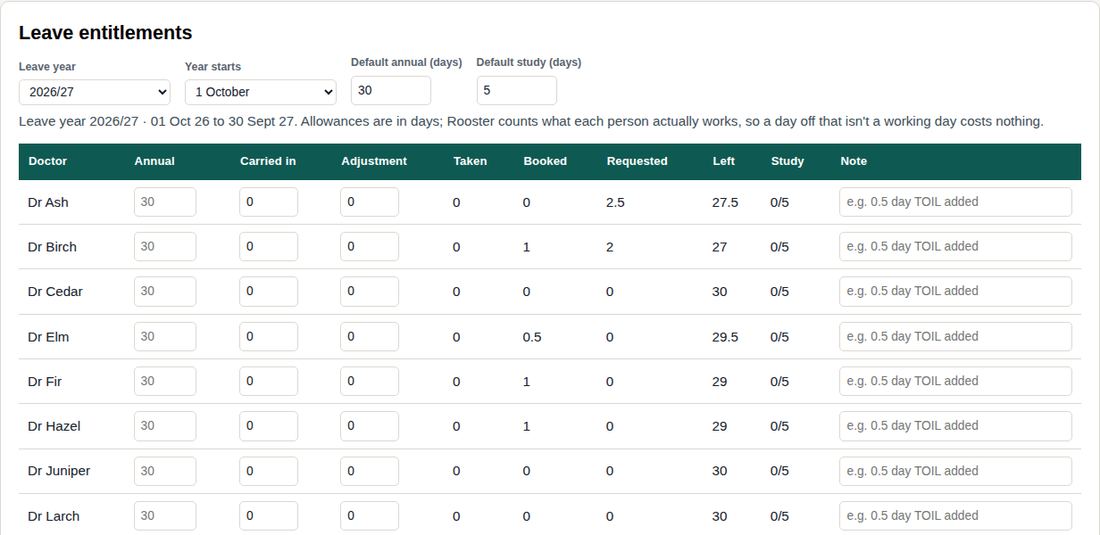
Leave entitlements
Blank allowance means the practice default. Adjustment is for anything one-off — TOIL added, unpaid leave taken. Only Annual Leave and Study Leave count against allowances; meetings, admin time and sickness don't.
Send a message
Goes to everyone with an account, or to one person. They see it on their Messages tab, with a count until they read it.
Users
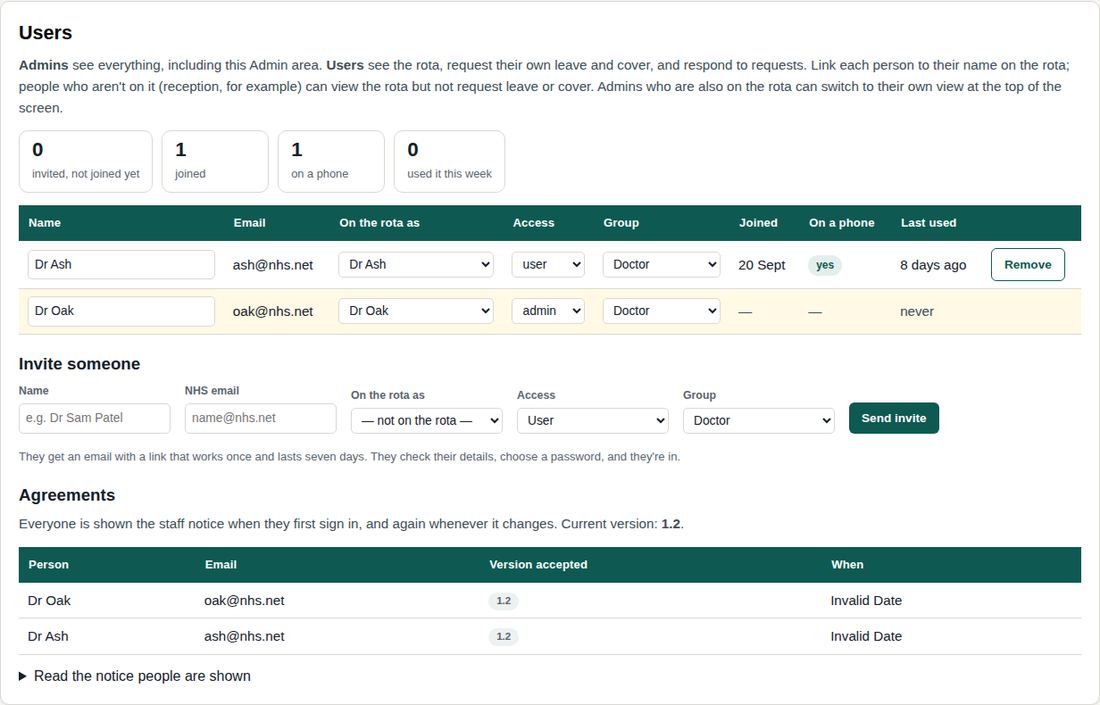
Admins see everything, including this Admin area. Users see the rota, request their own leave and cover, and respond to requests. Link each person to their name on the rota; people who aren't on it (reception, for example) can view the rota but not request leave or cover. Admins who are also on the rota can switch to their own view at the top of the screen.
Agreements
| Name | Doctor on the roster | Tier | Group | Alerts | PIN | Actions |
|---|
Sign-in keeps casual users to their own tier on a shared computer. It isn't strong security: anyone with a copy of the Rooster file can read its data. PINs are stored scrambled, never as typed.
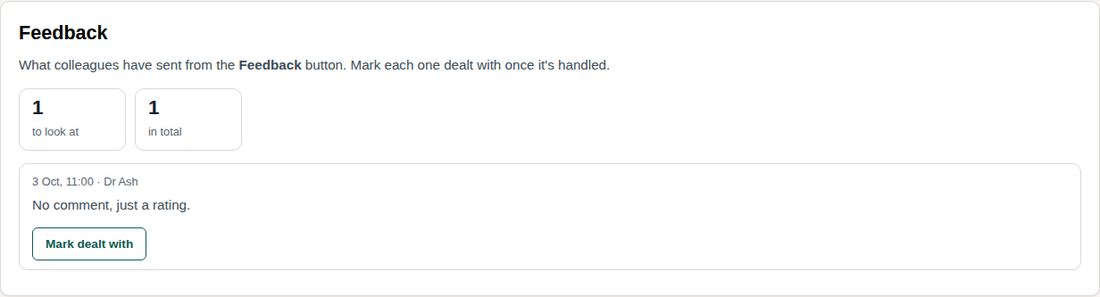
Feedback
What colleagues have sent from the Feedback button. Mark each one dealt with once it's handled.
Loading…
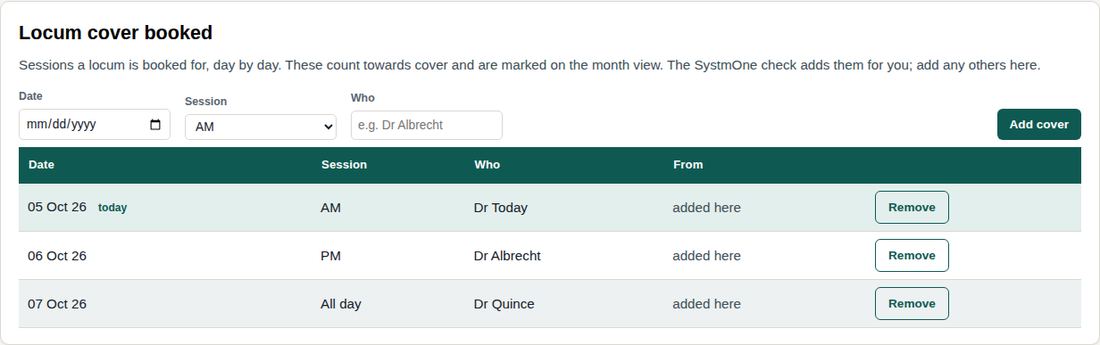
Locum cover booked
Sessions a locum is booked for, day by day. These count towards cover and are marked on the month view. The SystmOne check adds them for you; add any others here.
Roster — standard weekly pattern
One row per doctor. FULL / AM / PM / OFF.
| Name | Initials | Trainee | Cover / locum | Mon | Tue | Wed | Thu | Fri | Starts | Ends | Actions |
|---|
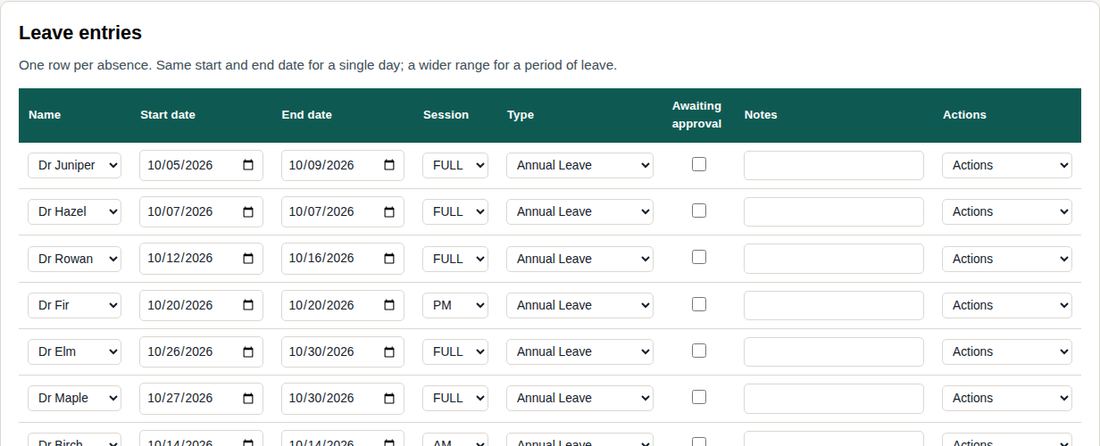
Leave entries
One row per absence. Same start and end date for a single day; a wider range for a period of leave.
| Name | Start date | End date | Session | Type | Awaiting approval | Notes | Actions |
|---|
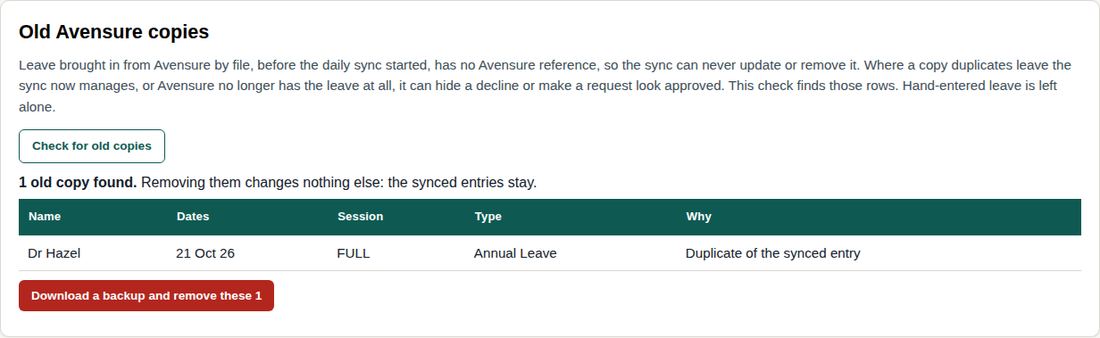
Old Avensure copies
Leave brought in from Avensure by file, before the daily sync started, has no Avensure reference, so the sync can never update or remove it. Where a copy duplicates leave the sync now manages, or Avensure no longer has the leave at all, it can hide a decline or make a request look approved. This check finds those rows. Hand-entered leave is left alone.
Weekly on-call message
A WhatsApp-ready snapshot of who is on call each AM and PM. It rebuilds automatically whenever you change the roster, on-call rota or record leave/sickness — so if someone goes off sick mid-week, log it on the Leave tab and this updates itself. Use Refresh if you want to force a rebuild.
Edit the text directly if you want to add a note before sending — Copy takes whatever is in the box. Changing any data elsewhere rebuilds it.
On-call — default pattern
One AM (08:00-13:00) and one PM (13:00-18:30) doctor per weekday. It can repeat every week, or alternate over 2 weeks (Week 1, Week 2, Week 1… counted from the Monday you set).
| Weekday | AM on-call | PM on-call |
|---|
On-call — overrides
One-off swaps. Takes priority over the default for that date only. Shown a month at a time.
| Date | AM on-call | PM on-call | Actions |
|---|
Recurring blocked sessions
Standing commitments that repeat — meetings, tutorials, portfolio reviews. These sessions don't count towards cover: the doctor may be in the building but can't see patients, so the day's rating drops accordingly. "When" controls which occurrence: first, second, third or last of the month, every week, every week except the first, or every other week — for that, pick a date it happens and it repeats fortnightly from there.
| Label | Doctor | Weekday | Session | When | Colour tag | Notes | Actions |
|---|
One-off changes
Change a recurring block for a single date without touching the standing rule — skip it that day, or hand it to someone else. A ⚠ means that block doesn't fall on the date chosen.
| Date | Recurring block | Change | Hand to | Note | Actions |
|---|
Student teaching timetable
Term 1 master timetable. On a teaching day the AM clinic GP sees 6 patients (20 min each, plus a 10 min debrief with the students sitting in), and the PM lecture GP gives the lecture instead of a clinic. Leave AM or PM blank and that doctor stays on normal duties.
| Date | Location | Theme | Pair | AM clinic GP | PM lecture GP | Notes | Actions |
|---|
Insights
How Rooster is being used, week by week: who's using it, on what, and which parts. Totals only — no one's activity is shown to admins.
Open this tab to load.
The team
Who works which days in a usual week, and who is usually on call. Leave, swaps and one-off changes are on the Rota.
Forecaster
The day’s appointment ledger with a recommended Rapid Health slot mix for each clinician, from the live rota (who’s in, on call, leave, meetings and teaching) and typical demand from the Rapid Health export. Advisory only — slots are still set in SystmOne.
Recent changes
Every addition, edit and removal in Rooster: who made it and when. Use Undo to put back the most recent change to an entry. Only admins see this.
Open this tab to load.
On-call tally
Sessions each doctor is on call, teaching, or on normal duties, for one calendar month. A session is one AM or one PM — a full day counts as two.
Leave requests and shift booking
Where leave requests are sent, and shift booking.
The passcode keeps casual users out of Admin on a shared computer. It is not strong security: anyone with a copy of the Rooster file can read its data.
Expected cover
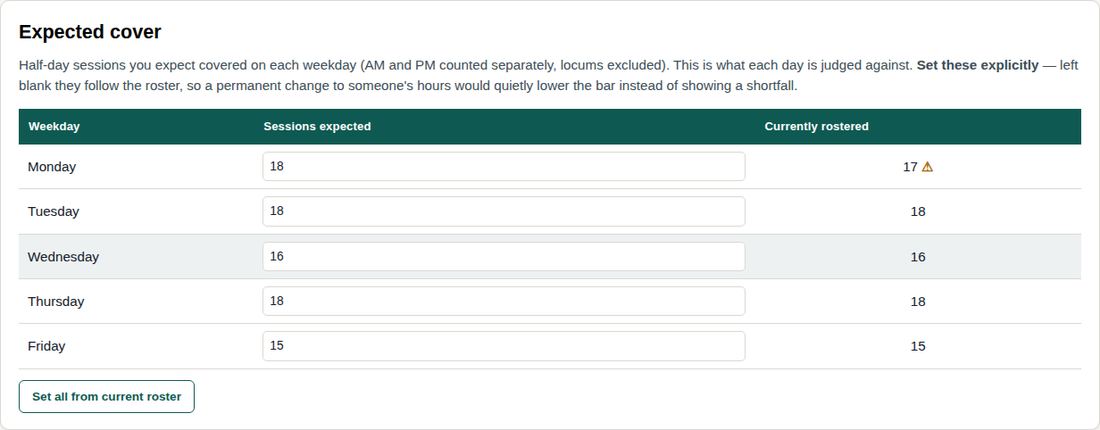
Half-day sessions you expect covered on each weekday (AM and PM counted separately, locums excluded). This is what each day is judged against. Set these explicitly — left blank they follow the roster, so a permanent change to someone's hours would quietly lower the bar instead of showing a shortfall.
| Weekday | Sessions expected | Currently rostered |
|---|
Practice closures
Bank holidays and other full closures. Shown as CLOSED rather than a false shortfall.
| Date | Notes | Actions |
|---|
Quick answers for using Rooster. Search above, or look below.
Getting in
- Go to roosterrota.co.uk and sign in with your NHS email and password.
- Forgotten your password? Use the link on the sign-in screen. Check junk if the email doesn't arrive.
- Put it on your phone: Share → Add to Home Screen (iPhone) or ⋮ → Add to Home screen (Android).
Your sessions
- Month shows your own sessions. Tap any day to see who's in.
- Rota → My shifts lists your week, with who you're working with and who's on call. All shifts shows everyone.
Leave
- Leave shows what you have left this year (from 1 October) and what's booked or waiting.
- To ask for leave: Leave → Check or request leave. You'll be told when it's approved or declined.
Available shifts
- If the practice needs cover, you may get an email and a bell note. Tap View it.
- To take it: Book it, then Yes, book it. The first to confirm gets it.
Cover and swaps
- Can't do a session? Leave → Ask a colleague to cover or swap. The first to accept gets it.
The bell, chats and your profile
- The bell shows a number when something needs you.
- Chats are one-to-one; only the two of you can read them. Practice notices are pinned at the top.
- Tap your initials (top right), then Profile & sign out to change your details, password or how Rooster contacts you.
Your information
- Colleagues see that someone is off, never why: it shows as “Absent”. Only admins see reasons, and they keep them confidential.
- There is no patient data in Rooster.
If something looks wrong
- A bar saying a new version is ready? Tap Reload.
- Sessions look wrong? Tell an admin; the rota comes from SystmOne.
- Anything confusing or missing: use Feedback about Rooster at the bottom of the screen.
A guide to every admin task, with pictures from Rooster (made-up names). Search above, or open a topic. Topics marked computer use Admin tabs that only show on a computer.
Admin view and your own view
- If you're an admin and also on the rota, the switch in the grey title band chooses Just me (exactly what colleagues see) or Admin (everyone's cover, approvals and the Admin area).
- It's one account: the switch changes what you see, not what you're allowed to do. In Just me, absence reasons are hidden, as they are for colleagues.
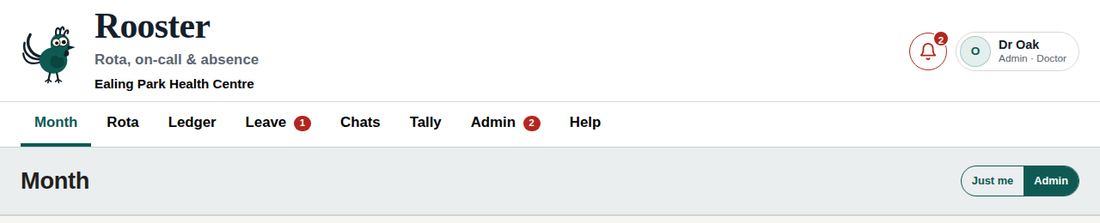
Checking cover: the Month view
- Each working day is rated OK (green), Shortfall amber (4 sessions short) or red (5 or more short, or on-call not covered). Up to 3 short stays green. The reason is written on the day.
- Click a day to open it on the Rota; click its status to see who's off on the leave calendar.
- Deal with red days first. Use See cover options on the ledger (below) to fill them.
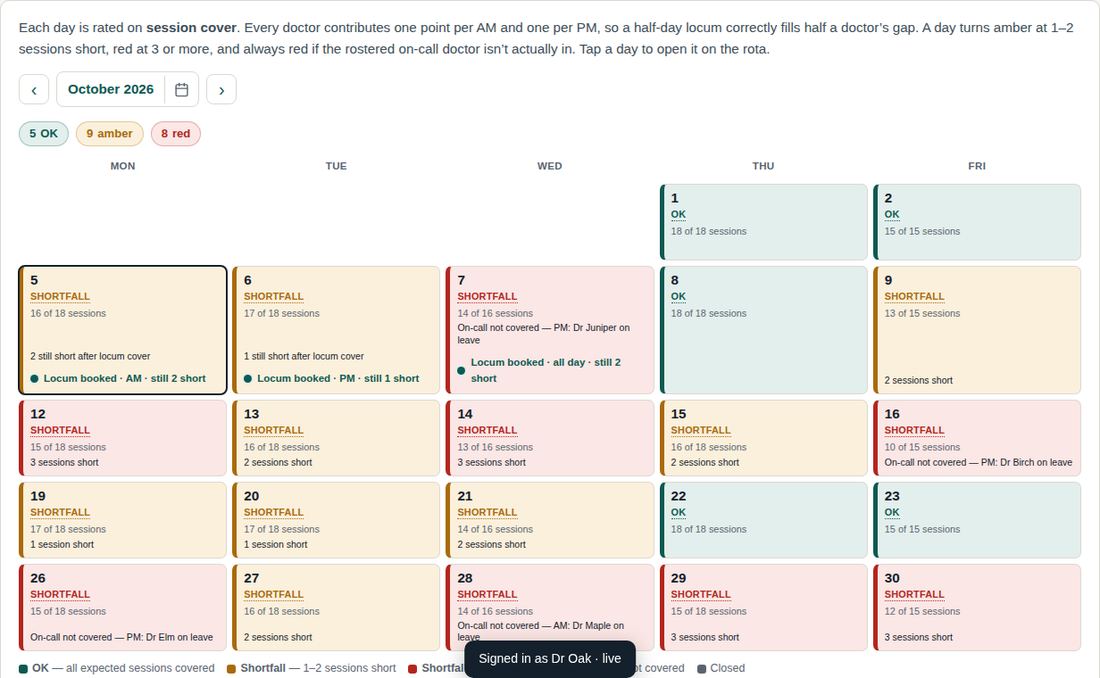
The day ledger and its colour bar
- The bar at the top of each day uses the same colours as the Month view, with the status and reason.
- On amber and red days, press See cover options → to open the people who could fill that day.
- Below the bar, each column is a doctor's day, block by block: clinics, on-call, teaching, leave and admin.
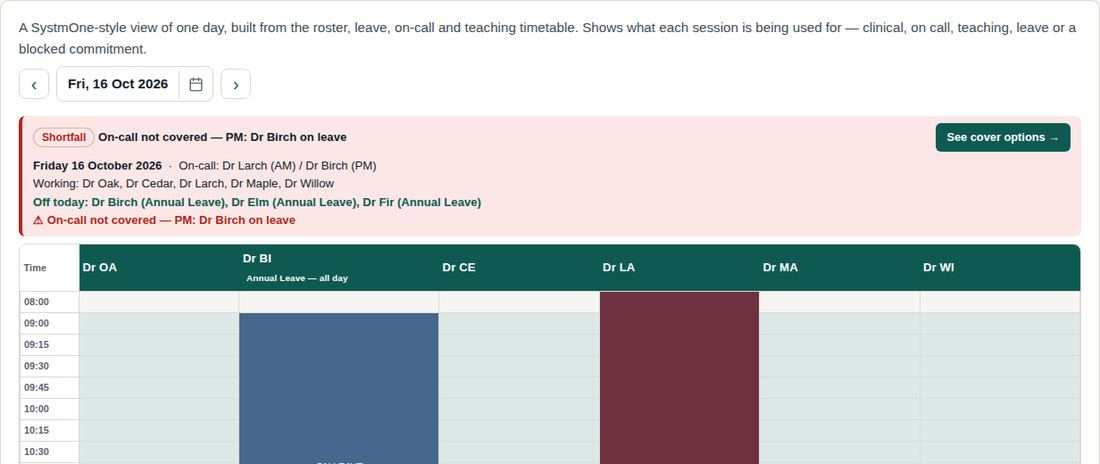
Leave from Avensure (daily sync)
- Rooster reads the Avensure absence calendar every morning at 06:10, including requests not yet decided.
- Need it sooner? Admin → Weekly update → Refresh now. Check without changing anything shows what a sync would do.
- If a request waiting in Avensure doesn't appear, press Refresh now; if it's still missing, the Avensure feed may only include your own pending requests.

Weekly SystmOne check computer
- Export the rota from SystmOne (Staff, Type, Name, Start Time and Format columns) and drop the file onto Admin → Weekly update.
- Rooster compares only the days SystmOne has built, and ignores holding lines (ON CALL, Dr; LOCUM; NHS111) and non-GP staff.
- Review: Working patterns that differ every week, On call in SystmOne, Locum cover, and sessions missing where no leave is recorded.
- Tick what's right and press Agree selected changes. Nothing changes until you do.
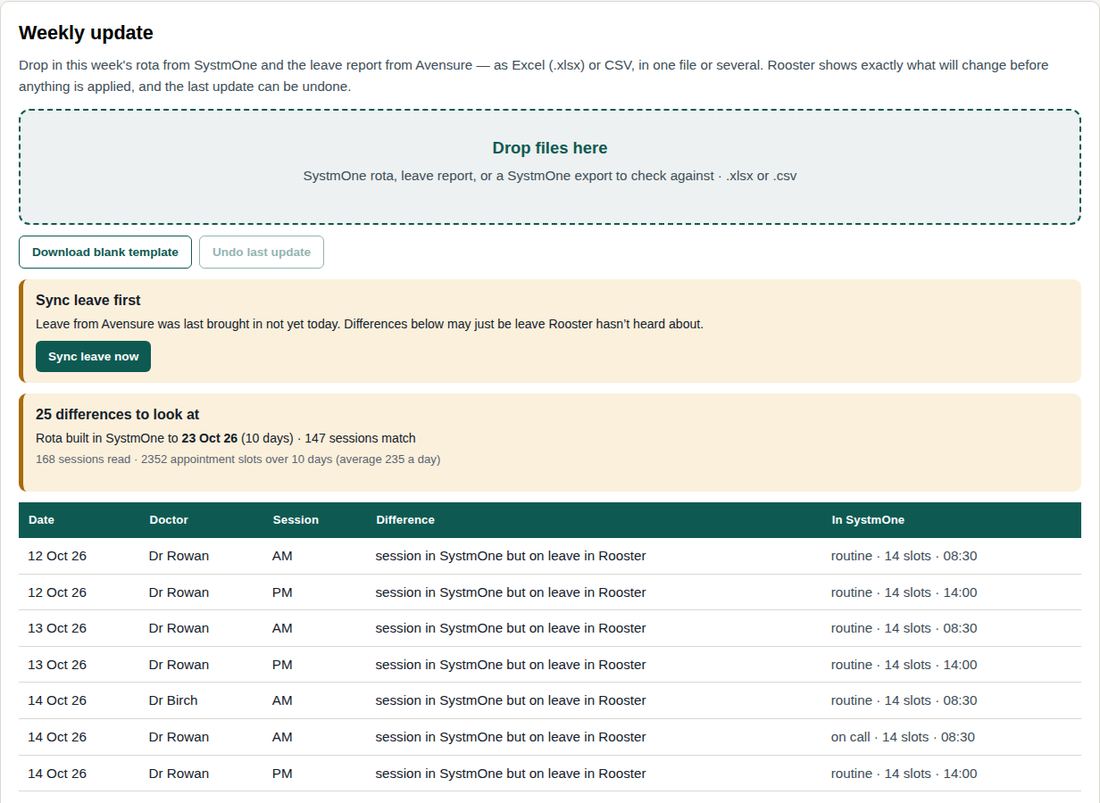
Heads Up, the Thursday email and Insights
- Heads up (next to the OK, amber and red counts on Month) makes a one-page summary from today to the end of the month: red days with the reason, amber days, rota clashes, leave requests waiting, open cover offers and locums. Choose Save as PDF in the print window. In the last week of a month it includes the next month too.
- Every Thursday at 09:00 admins get the same summary by email for the next two working weeks. It uses the figures from the last time an admin had Rooster open, and says so if they're more than three days old.
- Each admin chooses their emails in their profile (tap your initials): the Thursday heads-up, shifts booked, cover or swaps agreed, and leave requested in Rooster. Rooster bell only turns all Rooster emails off.
- Admin → Insights shows how Rooster is used each week. Totals only; numbers under 3 show as <3. Only the Rooster lead can look at one person's use, and every look is recorded.
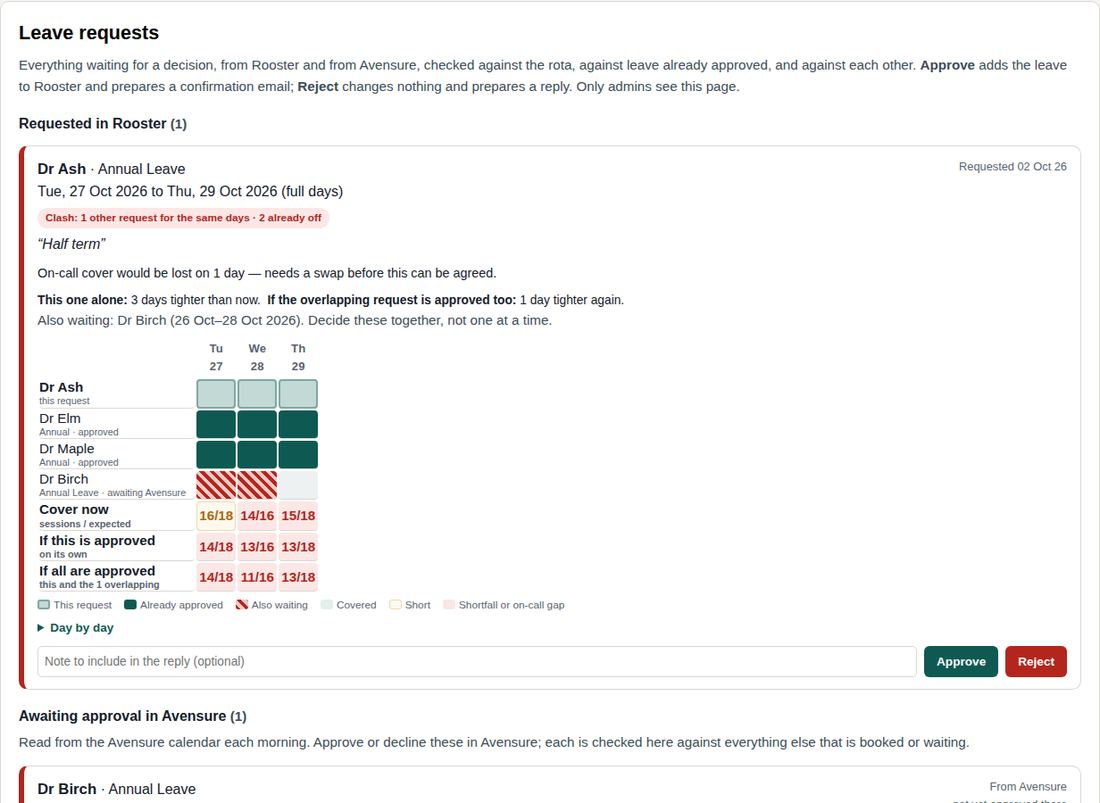
Deciding leave requests
- Requested in Rooster: decide with Approve or Reject (optional note). Awaiting approval in Avensure: decide in Avensure; Rooster picks it up at the next sync.
- Each request shows a clash label and a grid: the person, colleagues already off, colleagues also waiting (striped), then cover now, if this one is approved, and if all overlapping are approved.
- Decide overlapping requests together. Rooster asks you to confirm before approving one that overlaps another.
- An Avensure request with gaps (several periods) shows as one request.
- Record leave you approve in Rooster in Avensure too.
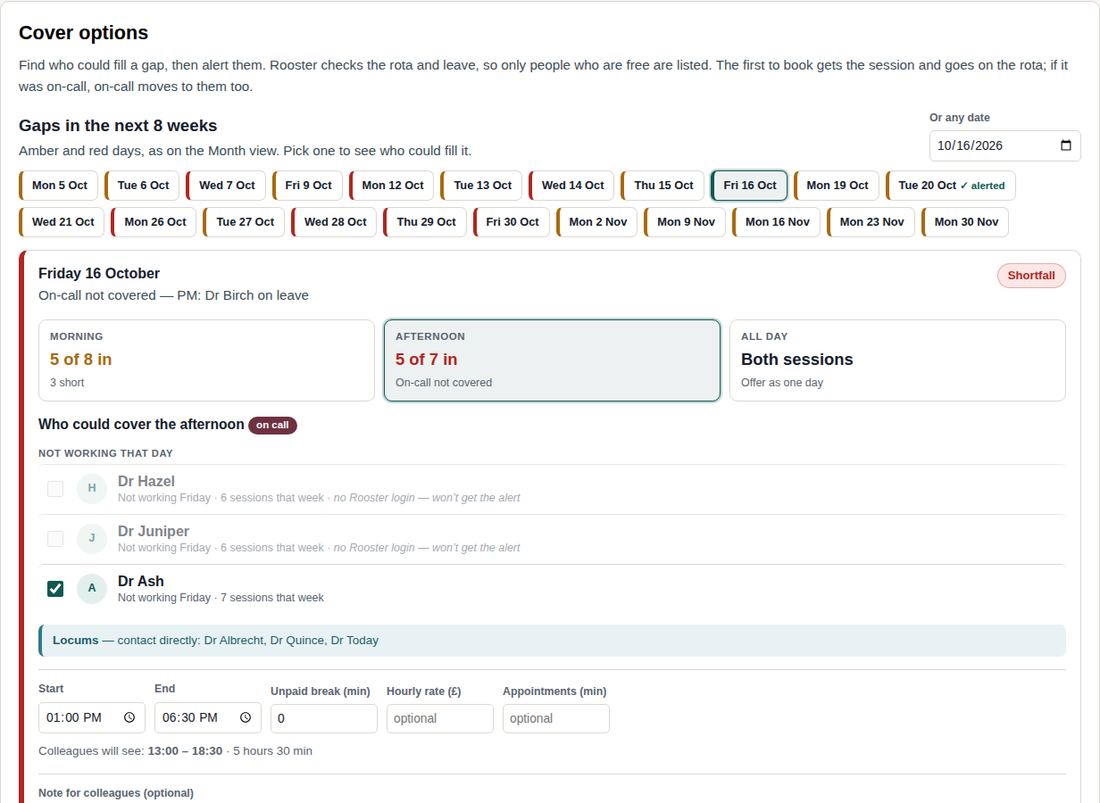
Filling a gap: cover alerts
- Open the day from the ledger (See cover options) or pick a date on the Cover options tab.
- Choose Morning, Afternoon or All day. On-call gaps are picked first. Rooster lists who's free and how many sessions each already has that week.
- Set times, unpaid break, hourly rate and appointment length; add a note if useful. The line underneath shows exactly what colleagues will see.
- Tick who to alert and press Alert. They get a bell note and a “Cover request” email with View and book.
- People already alerted start unticked (Alert sent). Ticking more adds them to the same offer; re-ticking sends a reminder.
- The first to book gets it and goes on the rota; you're emailed. Add it in SystmOne at the next update. Unbooked within 48 hours? Book a locum.
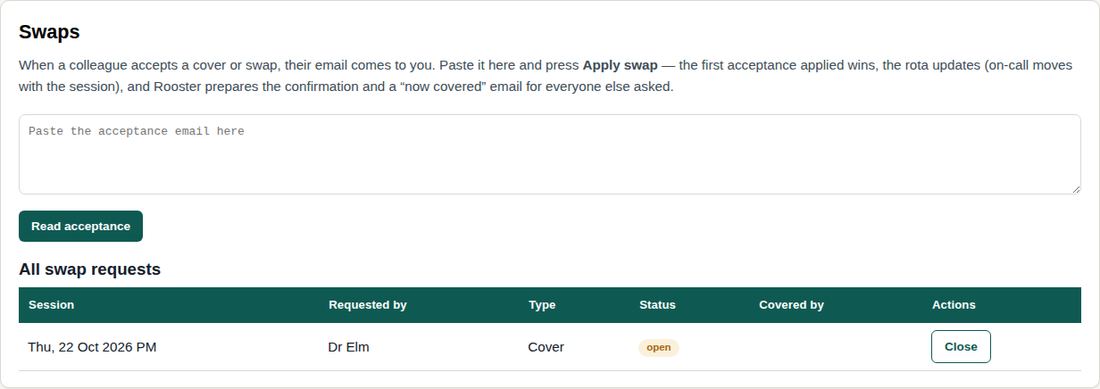
Swaps between colleagues
- A doctor asks colleagues to cover or swap a session from the Leave tab; they accept under their bell.
- The acceptance appears under your bell: open it and press Apply swap. The first acceptance applied wins; on-call moves with the session.
- Reverse on Admin → Swaps undoes a swap.
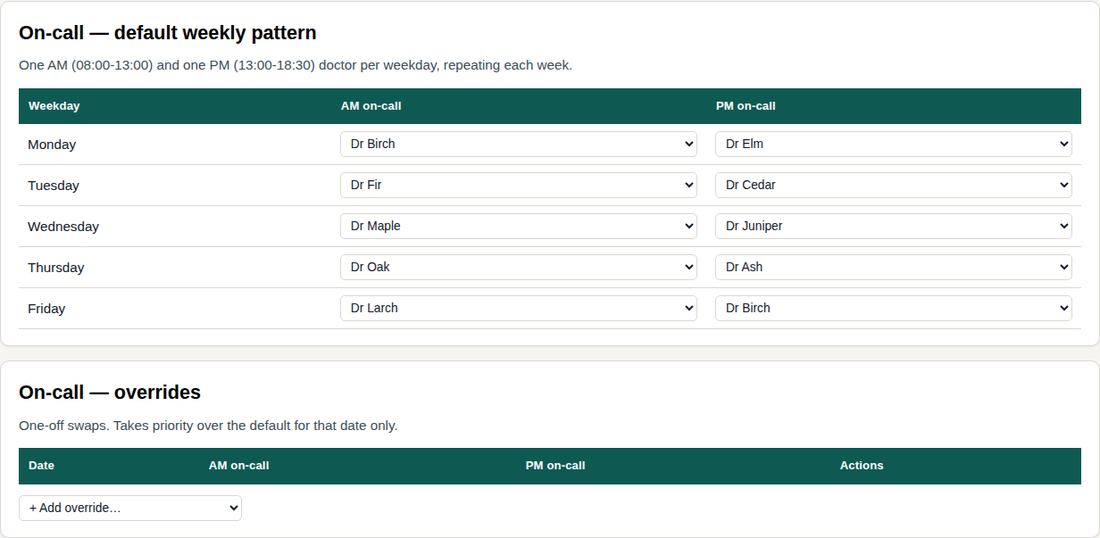
On-call pattern and date overrides
- The weekly on-call pattern (one AM, one PM doctor per weekday) is set on Admin → On-call.
- For a single date, add an override; the weekly pattern is untouched.
- Never leave a session without on-call. Trainees aren't rostered on call.
Recording locum cover
- Booked locum sessions are listed on Admin → Roster → Locum cover booked. They count towards cover and show on the Month view.
- The SystmOne check adds locums it finds; add any others here by date, session and name.
Recording absence and leave entries computer
- Planned leave arrives from Avensure. Record anything else on Admin → Leave entries: doctor, dates, session and type.
- Record unplanned absence as soon as it's reported. Colleagues see “Absent”, never the reason.
Clearing old Avensure copies computer
- Leave brought in from a file before the daily sync has no Avensure reference, so the sync can't update or remove it. It can hide a decline or make a request look approved.
- Admin → Leave entries → Old Avensure copies → Check for old copies lists them with the reason for each.
- Download a backup and remove saves a copy first, then asks you to confirm. Synced and hand-entered leave are never touched.
Entitlements and balances computer
- Admin → Entitlements: each doctor's allowance, carry-over and adjustments for the leave year (from 1 October).
- Taken, booked and requested days are worked out from the rota, so a day off that isn't a working day costs nothing. Each piece of leave is counted once.
Inviting people and seeing who uses Rooster computer
- Admin → Users → Invite someone: name, NHS email, User or Admin, and their name on the rota.
- They get a one-use link valid for seven days. Resend issues a new one.
- The table shows who has joined, who has Rooster on their phone, and when each person last used it.
- Remove leavers on their last day. Keep at least two admins.
Staff feedback
- Anything sent with the Feedback button arrives on Admin → Feedback. Read it weekly and mark each item dealt with.
Expected cover per weekday computer
- On Admin → Settings → Expected cover, type the sessions you expect each weekday. Each day is judged against this.
- Set all from current roster copies today's pattern totals. A ⚠ marks a weekday where the roster no longer matches.
When emails don't arrive
- Check junk; mark the email Not junk and add rooster@roosterrota.co.uk to safe senders. Ask the NHSmail local administrator to trust the sender for the practice.
- NHSmail may warn about the link the first time; it clears once checked.
- Resend's Emails page shows whether each email was delivered, delayed or bounced.
- If Rooster says “the email didn't go”, the rooster-notify function in Supabase needs redeploying: confirm the green “deployed” message.
Backups, new versions and limits
- The database is backed up automatically every day. Keep at least two admins.
- After a new version is uploaded, people see a bar offering Reload.
- Past dates are reconstructed from current data. The teaching timetable runs to 8 January 2027: add Term 2 before then. Recurring blocks repeat until deleted.
- The full procedure is on Admin → SOP.